WebPad
What’s inside
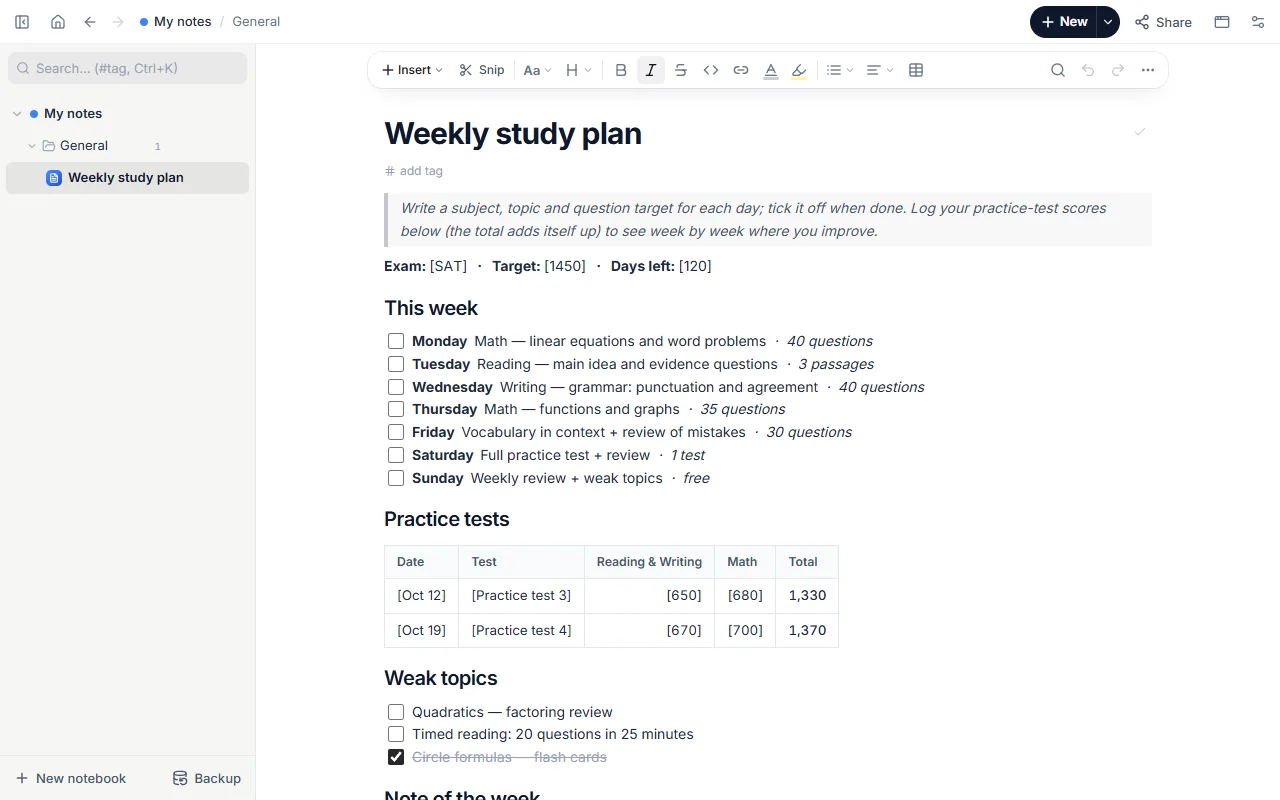
- Exam, target score and days-left line
- Seven days to tick off: subject — topic · target
- Practice-test log with a total that adds itself up
- Weak topics checklist and a note of the week
How to use it
- Press “Start with this template”; it opens with an example SAT week.
- Change the target line to your own exam (clicking a [bracketed] part selects it).
- Give each day your own subject and topic with a realistic target. Tick a day when it is done.
- After every practice test add a row to the log; the total cell computes itself.
- At the end of the week review the weak topics and set up next week from a copy of this page.
Tips that help
- Write a measurable target, not just a topic: “Functions — 35 questions”, not “Functions”. Counting the days you missed shows what breaks the plan.
- Leave one day light for review and catching up. A plan with every day full falls apart at the first slip.
- Log scores per section: the total can stay flat while one section drops and another rises.
Questions
How does the total add itself up?
Table cells take formulas as in a spreadsheet: the total cell holds =SUM(C2:D2). Click it to see the formula; for a new row, copy it and change the row number.
Does it work for other exams?
Yes. Rename the subjects and the score columns; adding or removing a column is in the table menu.
Is it free? Do I need an account?
Free, and no account. “Start with this template” opens it in the WebPad Studio web version, ready to write in.
Where is what I write saved?
In your browser’s own storage, on your device only. If you like, back it up to your own Google Drive and sync it across devices; there is no server of ours.
Can I download it as PDF or Word?
Yes. Text pages download as PDF and Word, drawings save as images, and you can share a page with a link.