WebPad
What’s inside
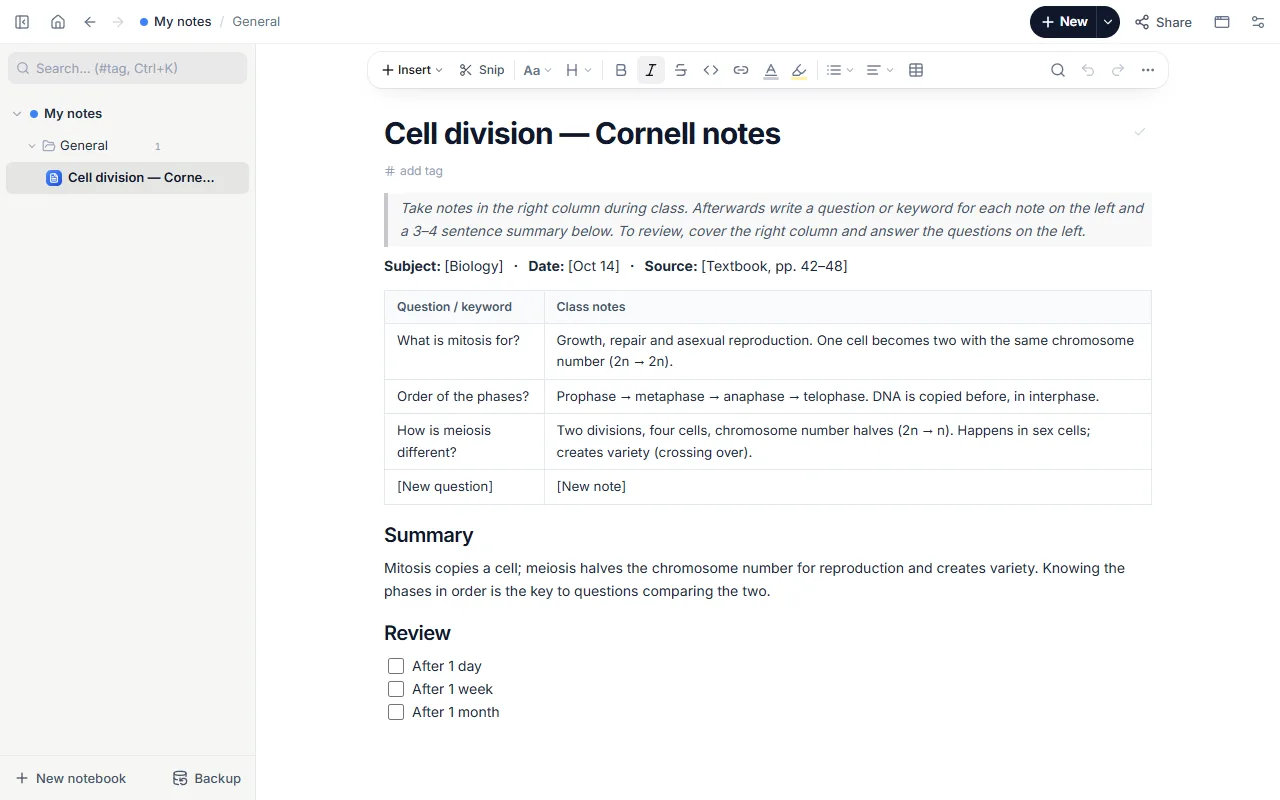
- Subject, date and source line
- Two-column table: question / keyword and class notes
- A 3–4 sentence summary
- Spaced review list: after 1 day, 1 week, 1 month
How to use it
- Open the template; it comes filled with notes on cell division.
- During class, write only in the right column: short sentences, abbreviations, examples.
- Within an hour after class, add a question or keyword for each note on the left.
- Summarise the topic in your own words in 3–4 sentences at the bottom.
- On review days answer the questions without looking at the right column, then tick the review.
Tips that help
- Write questions on the left, not headings: “What is mitosis for?” beats “Mitosis”. Testing yourself sticks far better than re-reading.
- If you can’t write the summary, the topic hasn’t settled yet; put it on your weak-topics list.
- Snip a figure or definition from the textbook into the notes (Alt+Shift+S in the extension).
Questions
What is the Cornell method?
A note layout from Cornell University: the page is split into notes, cue questions and a summary. You learn by asking questions afterwards, not while writing.
Can I add rows?
Yes. Press Tab in the last cell, or use “Row below” in the table menu.
Is it free? Do I need an account?
Free, and no account. “Start with this template” opens it in the WebPad Studio web version, ready to write in.
Where is what I write saved?
In your browser’s own storage, on your device only. If you like, back it up to your own Google Drive and sync it across devices; there is no server of ours.
Can I download it as PDF or Word?
Yes. Text pages download as PDF and Word, drawings save as images, and you can share a page with a link.