WebPad
What’s inside
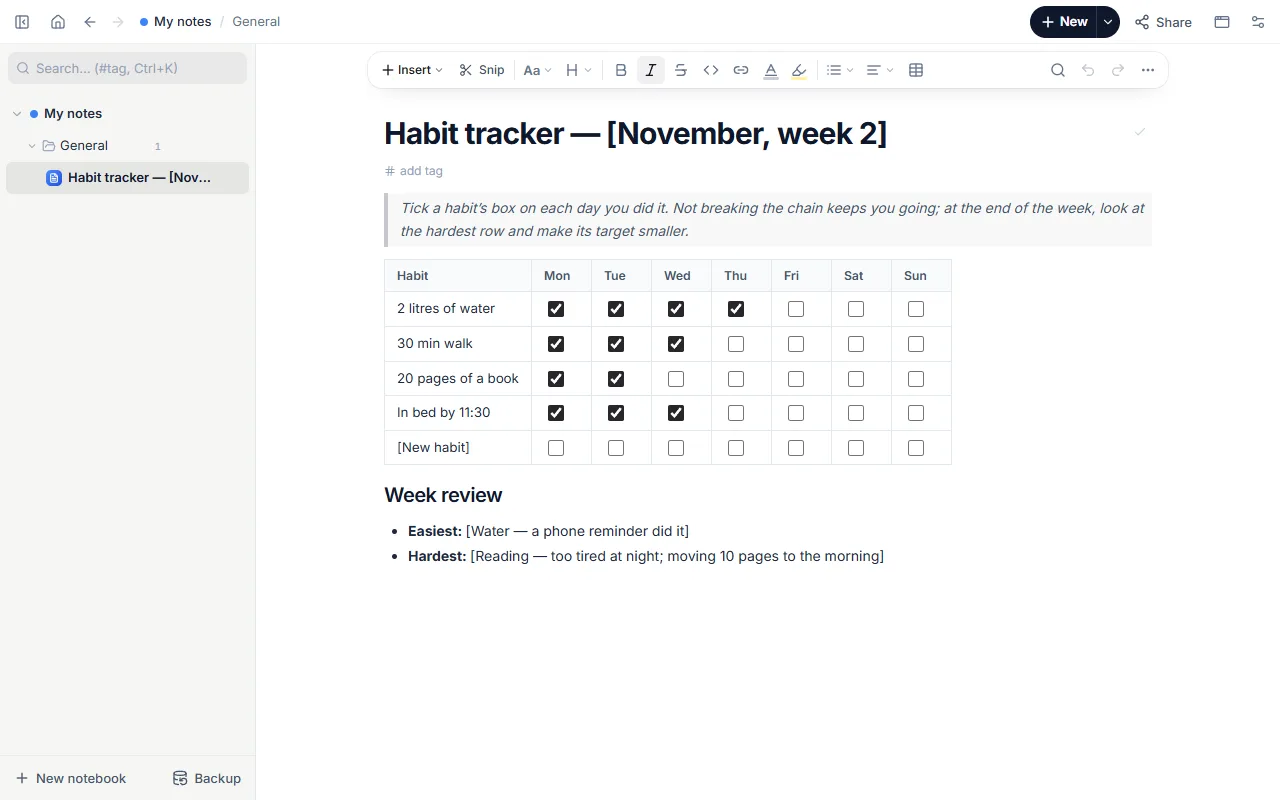
- Weekly table: habit × 7 days with tick boxes
- Four example habits and an empty row
- Week review: easiest and hardest
How to use it
- Open the template and change the week in the title.
- Replace the example habits with yours; 3–5 is plenty.
- Tick a habit’s box each day you do it.
- At the end of the week write the easiest and hardest habit, and shrink the hard one’s target.
- For a new week copy the page and clear the boxes.
Tips that help
- Start small: if “20 pages” doesn’t happen, write “5 pages”. A small chain that holds beats a big one that breaks.
- Tie a habit to something you already do: “10 pages after coffee”.
- Never miss twice: one missed day happens, two is the start of a new habit.
Questions
Does it work on a phone?
Yes. The web version runs like an app on phones and can be added to the home screen; tap the boxes with your finger.
Is it free? Do I need an account?
Free, and no account. “Start with this template” opens it in the WebPad Studio web version, ready to write in.
Where is what I write saved?
In your browser’s own storage, on your device only. If you like, back it up to your own Google Drive and sync it across devices; there is no server of ours.
Can I download it as PDF or Word?
Yes. Text pages download as PDF and Word, drawings save as images, and you can share a page with a link.