WebPad
What’s inside
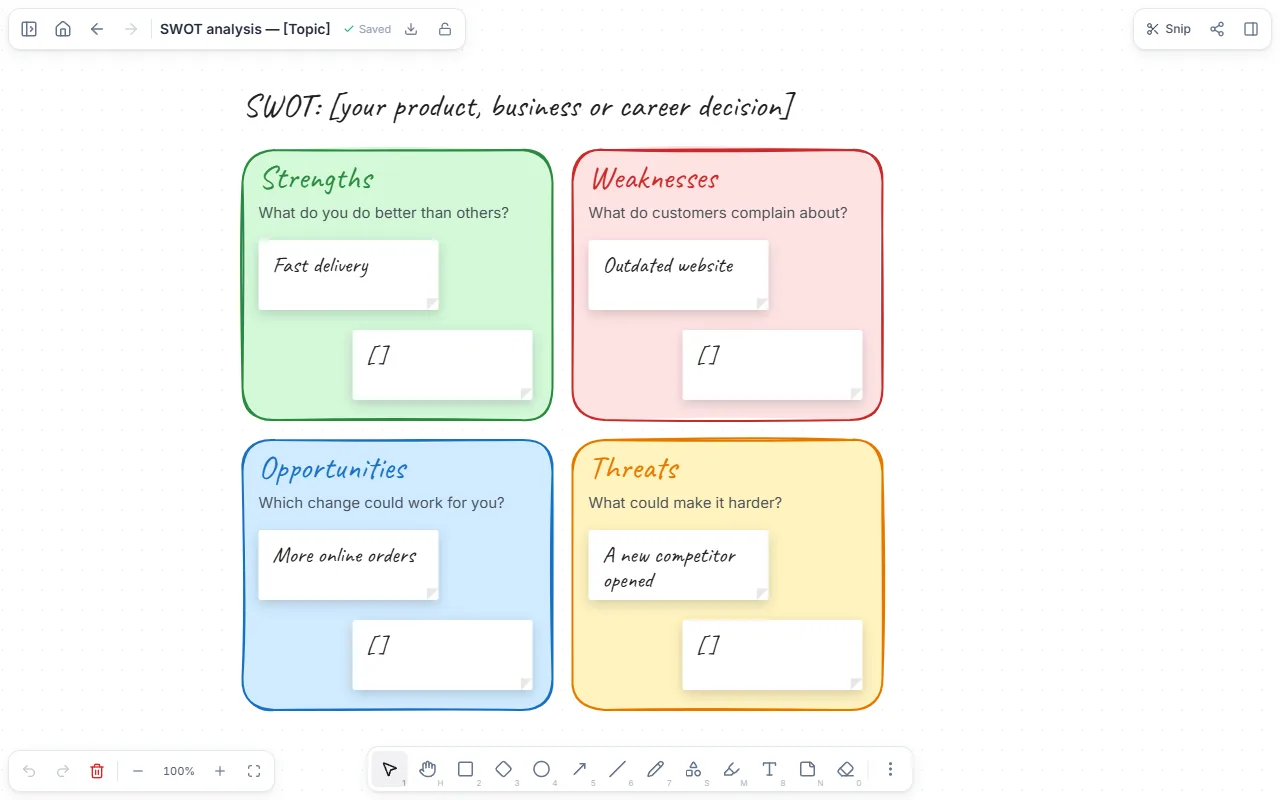
- Four coloured squares: strengths, weaknesses, opportunities, threats
- A guiding question in each
- A sample first answer in each
How to use it
- Open the template and write what you’re analysing in the title.
- Read the question in each square and add your answers as sticky notes.
- Strengths and weaknesses are things you control; opportunities and threats come from outside.
- When done, pick the most important item in each square and turn it into an action.
Tips that help
- Be concrete: not “good team” but “two experienced mobile developers on the team”.
- If an item fits both strengths and weaknesses, define it more narrowly.
- Do the analysis for a decision: a SWOT without a question like “Should we open a second shop?” stays a list.
Questions
Does it work for a personal SWOT?
Yes, for a career decision or before a job application: your strengths and weaknesses, the opportunities and threats in your field.
Is it free? Do I need an account?
Free, and no account. “Start with this template” opens it in the WebPad Studio web version, ready to write in.
Where is what I write saved?
In your browser’s own storage, on your device only. If you like, back it up to your own Google Drive and sync it across devices; there is no server of ours.
Can I download it as PDF or Word?
Yes. Text pages download as PDF and Word, drawings save as images, and you can share a page with a link.