WebPad
What’s inside
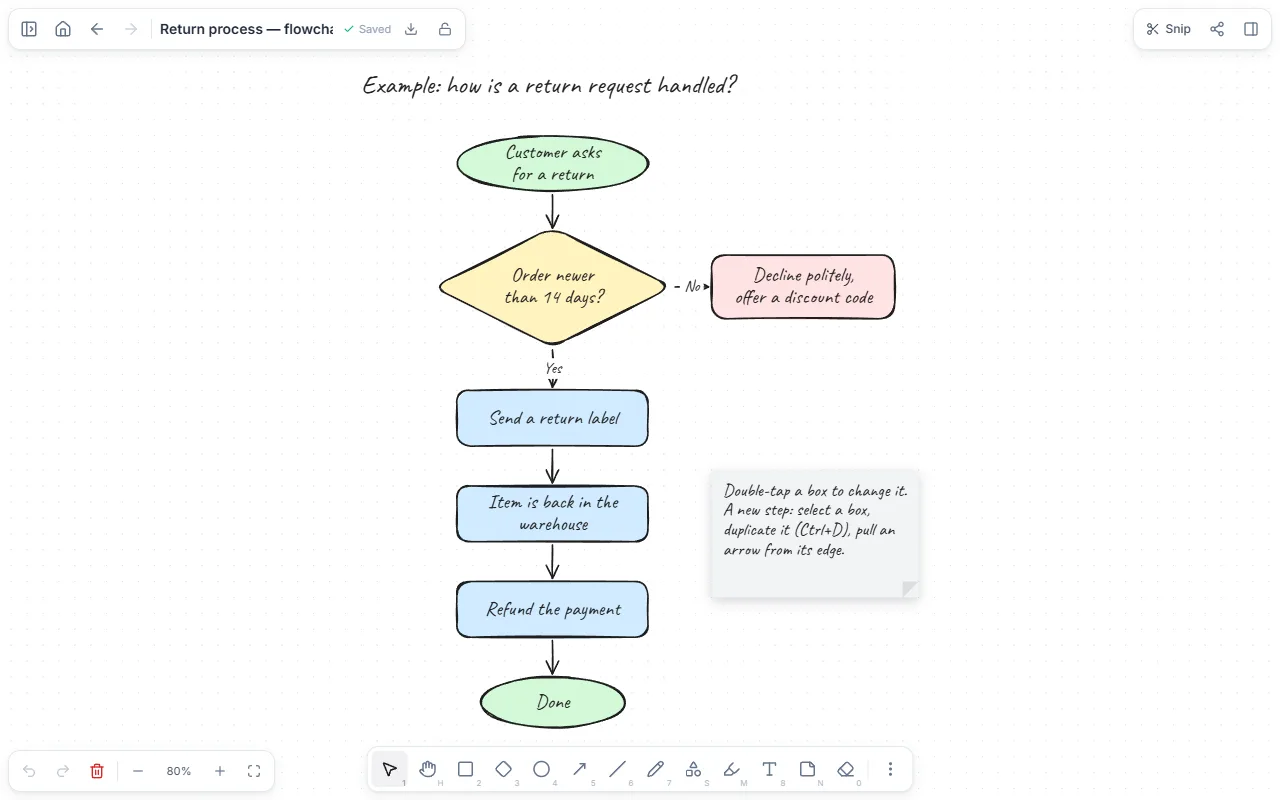
- Start and end shapes
- Step boxes and a decision diamond
- Labelled arrows bound to the boxes (yes / no)
- A short how-to note
How to use it
- Open the template; you’ll see the returns-process chart.
- Double-click a box to change its text.
- For a new step, select a box and duplicate it (Ctrl+D), then move it into place.
- Pull a new arrow from a box’s edge and drop it on another box; it binds to both.
- When done, download the chart as an image or place it in a text page.
Tips that help
- One action per box, starting with a verb: “Refund the payment”.
- Write the decision as a question and label each outgoing arrow with its answer.
- If the chart doesn’t fit a screen, split the process and move detail to a second chart.
Questions
Which shapes are there?
Rectangle, rounded box, ellipse, diamond, arrows, lines, text, sticky notes and free drawing, with colours and fonts.
How do I export it?
Download the drawing as PNG or SVG, or place it in a text page and export that as PDF.
Is it free? Do I need an account?
Free, and no account. “Start with this template” opens it in the WebPad Studio web version, ready to write in.
Where is what I write saved?
In your browser’s own storage, on your device only. If you like, back it up to your own Google Drive and sync it across devices; there is no server of ours.
Can I download it as PDF or Word?
Yes. Text pages download as PDF and Word, drawings save as images, and you can share a page with a link.