WebPad
What’s inside
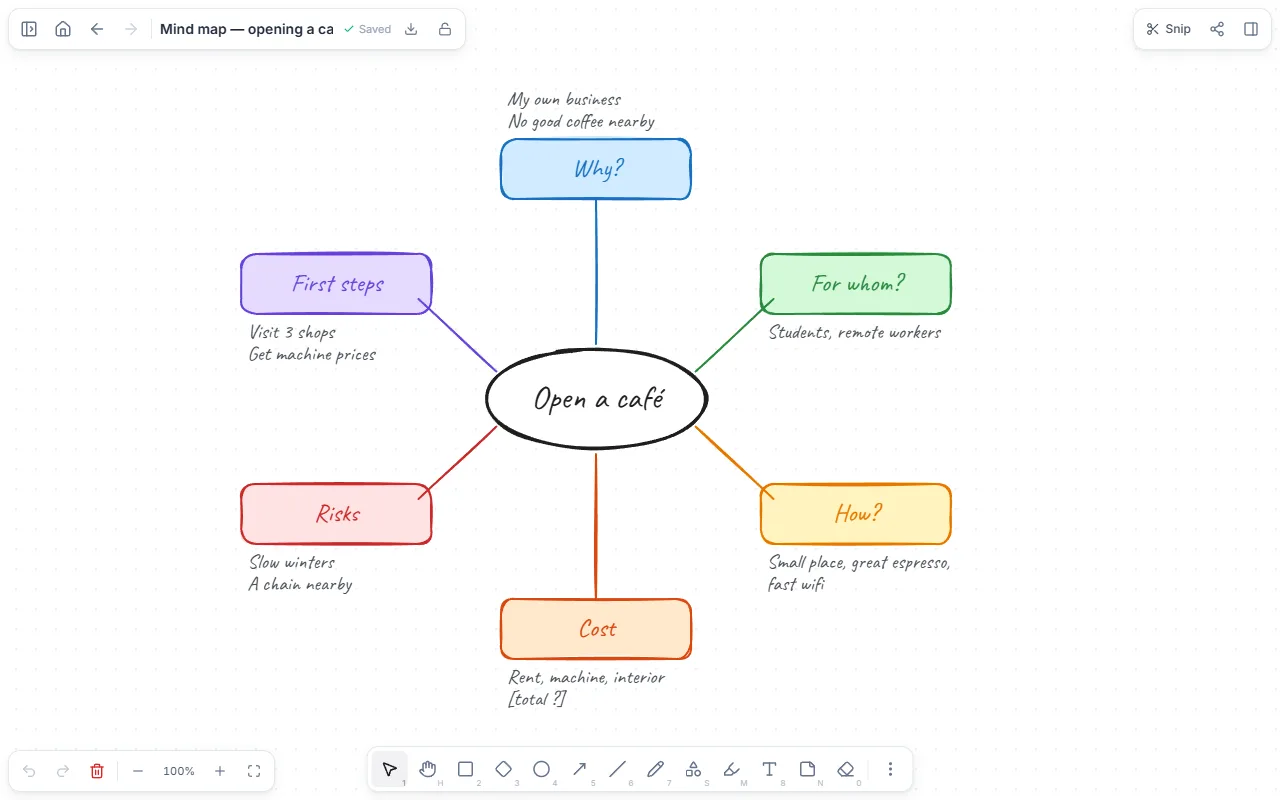
- A central idea
- Six main branches with sticky notes
- Lines tying the branches together
How to use it
- Open the template, double-click the centre and write your topic.
- Rename the branches for your topic; delete any you don’t need.
- Add whatever comes to mind as sticky notes on each branch, without judging yet.
- Then sort: merge repeats, colour the most important notes.
- Move the items under “First steps” to a to-do list.
Tips that help
- Write a word or short phrase per note; full sentences slow thinking down.
- If a branch gets crowded, make it the centre of its own map.
- Open the map again the next day: what didn’t occur to you on day one shows up then.
Questions
Can I put the mind map in a note?
Yes. Place the drawing in a text page or download it as an image.
Is it free? Do I need an account?
Free, and no account. “Start with this template” opens it in the WebPad Studio web version, ready to write in.
Where is what I write saved?
In your browser’s own storage, on your device only. If you like, back it up to your own Google Drive and sync it across devices; there is no server of ours.
Can I download it as PDF or Word?
Yes. Text pages download as PDF and Word, drawings save as images, and you can share a page with a link.